Blog



Citrix Licensing April 15th Deadline - Are You Ready?
Understanding Citrix LAS and the April 2026 Compliance Deadline
- Citrix License Activation Service (LAS) becomes mandatory on April 15, 2026—all file-based Citrix licensing will stop working after this date, putting unprepared environments at risk of service disruption or outage.
- Transitioning to LAS requires planning and upgrades, including a supported Citrix License Server version, LAS-compatible product builds, Citrix Cloud registration, and reliable outbound connectivity (with special considerations for offline or regulated environments).
- Many organizations are encountering delays due to legacy versions, network restrictions, and licensing model changes, making early assessment and expert guidance critical to avoid last-minute compliance and operational issues.
The Citrix License Activation Service (LAS) is a modern, cloud-based licensing system that replaces Citrix’s traditional file-based license model. Instead of downloading and installing license files on a local license server, organizations register their Citrix License Server with the Citrix Cloud LAS platform for automated, real-time activation of entitlements. This shift simplifies license management by eliminating manual updates and ensuring licenses are always current with your subscriptions.
A critical date is looming: April 15, 2026. On that day, Citrix will end support for all file-based licensing, making LAS the mandatory method to license Citrix on-premises products. In practical terms, any Citrix product still using legacy (file-based) activation after April 15, 2026 will cease to function properly, causing potential loss of service or outages. There is no grace period or fallback after this deadline – organizations must migrate to LAS or risk major disruption to their Citrix environments. Citrix’s own guidance is unequivocal: action must be taken now to ensure compliance and uninterrupted operation beyond this date.
This mandate applies broadly. In-scope products include Citrix Virtual Apps and Desktops (CVAD), Citrix Provisioning Services (PVS), Citrix (NetScaler) ADC appliances, Citrix Hypervisor (XenServer), Workspace Environment Management (WEM), XenMobile, Unicon Scout, and more. Even if you hold valid perpetual or subscription licenses beyond 2026, you must still switch the activation method to LAS – the old license files will simply no longer be recognized. For cloud-only Citrix customers (Citrix Cloud DaaS services), there is little impact since those use cloud entitlements already, but any hybrid or on-premises component must comply with LAS by the deadline. The urgency is clear: April 15, 2026 is a firm cutoff for adopting the new licensing system.
Key Requirements for Transitioning to LAS
Moving to the License Activation Service involves both technical prerequisites and operational steps. Organizations should prepare the following requirements to ensure a smooth transition:
- Citrix Cloud Account & Entitlements: You will need an active Citrix Cloud account (Citrix Cloud tenant) associated with your organization, with your purchased license entitlements visible in that account. The LAS model uses your cloud-hosted entitlement records instead of locally installed license files, so the license server must be linked to your Citrix Cloud Org ID. (Each license server registers to a single Citrix Cloud Org ID, so you may need multiple license servers if you manage licenses for separate organizations.) Ensure that your Citrix Cloud account’s Organization ID has all the necessary licenses and active support contracts associated with it.
- Updated License Server Software: Upgrade your on-premises Citrix License Server to a LAS-compatible version. The minimum supported version is Citrix License Server 11.17.2 (build 51000 or higher). Citrix introduced LAS functionality in this version, and any older license server will not support online activation. Citrix recommends installing the latest license server (e.g. 11.17.2 build 53100 or newer) for full compatibility. The good news is that the latest license server remains backward-compatible with older Citrix products and any remaining legacy license files, allowing a phased transition. Upgrading the license server is the first crucial step.
- Product Version Compatibility: In addition to the license server, your Citrix infrastructure components must be running versions that know how to use LAS. Older versions may not be aware of cloud licensing. For example, Citrix Virtual Apps and Desktops must be updated to a LAS-supported build (at least CVAD 2411 for current releases, or 2203 LTSR CU7 / 2402 LTSR CU3 / 2507 for Long Term Service Release editions). Similarly, Citrix XenServer hypervisor needs to be on version 8.4 or later to support the new licensing. Citrix NetScaler ADC appliances (now part of the Cloud Software Group) also require updated firmware: minimum versions such as NetScaler ADC 14.1-51.x or 13.1-60.x (and equivalent patches for SDX/ADM/Console) are LAS-compatible. Other components like XenMobile or Scout have their own minimum versions for LAS support (e.g. XenMobile 10.16 RP7 or above). Bottom line: check each Citrix product in your environment and plan to upgrade to the required versions before migrating licenses. Running an unsupported older version is a show-stopper for LAS activation and will require an upgrade.
- Network Connectivity (Cloud Access): The new licensing service is cloud-hosted, so your license server must have reliable outbound internet connectivity to Citrix’s cloud endpoints. In particular, the license server needs to reach Citrix LAS services over HTTPS (port 443). Ensure your firewall allows outbound connections to the relevant Citrix endpoints, such as las.cloud.com and related Citrix Cloud URLs. Citrix provides a list of specific service URLs that must be reachable for registration and periodic validation. Failing to open these routes will result in registration failures or an inability to activate licenses. In practice, the license server will periodically contact Citrix (typically every 12–24 hours) to synchronize license status. A stable, continuous internet connection for the license server is therefore required. (If your environment uses proxies or deep packet inspection, be sure to account for that so the license server’s traffic to Citrix Cloud is not blocked or altered.)
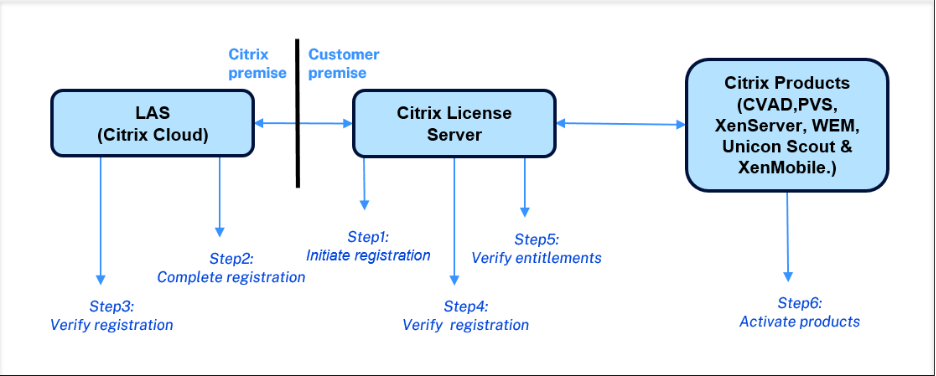
- One-Time Registration Process: Transitioning to LAS isn’t automatic; you must explicitly register your license server with Citrix Cloud. This is usually a one-time setup per license server. The process involves generating a registration code from the Citrix Licensing Manager on your license server, logging into your Citrix Cloud account to enter that code and authorize the registration, and then verifying on the license server that it’s successfully connected to Citrix Cloud. Citrix describes the workflow in three high-level steps: Upgrade – Register – Activate. Once registered, the license server will fetch and activate all eligible product licenses automatically from the cloud (no more manual license file uploads). It’s wise to perform this registration in a timely fashion and verify that your Citrix products are showing as licensed via LAS.
- Offline Environments (Special Consideration): What if your Citrix deployment is in an isolated network with no internet access (an “air-gapped” or highly secure environment)? Citrix has provided an offline activation method for LAS, but it requires extra effort and coordination. In an offline scenario, you cannot do real-time cloud validation; instead, you periodically export an activation request file from your license server, transfer it to a machine that can reach Citrix (or to Citrix support), and import an activation response back into your license server. This process may need to be repeated whenever licenses are renewed or changed. Citrix terms this a “dark site” or offline activation workflow, and it typically requires approval or assistance from Citrix to set up. If you operate in a closed network, plan ahead for a more involved migration. The key requirements (updated versions, etc.) still apply, but you must design a secure procedure to periodically sync license information with Citrix. This can be significantly more labor-intensive than the online method, so engage Citrix or a certified partner early to establish an offline licensing mechanism.
By meeting all the above requirements – having the right Citrix Cloud setup, updating your license server and products, and ensuring connectivity – your organization will be prepared to cut over to LAS. Once these prerequisites are in place, the actual switch to LAS can be straightforward: you’ll activate the new system and verify that your Citrix products are successfully obtaining licenses from the cloud. The effort invested upfront in upgrades and configuration will pay off in a smoother transition.
Common Issues and Challenges in Implementing LAS
Many organizations are finding that the transition to LAS, while beneficial in the long run, comes with practical challenges. Being aware of these issues can help you plan proactively and avoid pitfalls. Below are some of the most common challenges and how to address them:
- Legacy Versions and Compatibility Gaps: A top challenge is that older deployments often don’t meet the LAS compatibility criteria. For example, you might discover that your Citrix Virtual Apps and Desktops farm or your ADC appliances are running versions too old to support LAS. This forces a potentially significant upgrade effort on a tight timeline. Upgrading core infrastructure (Delivery Controllers, VDAs, NetScaler firmware, etc.) is not trivial – especially in enterprises with change control processes. Organizations must budget time for testing and deploying these updates. The scope can be broad: for instance, a customer on an older CVAD LTSR might need to update not just the controllers but also PVS, StoreFront, Workspace Environment Management, and other integrated components to maintain compatibility. These multi-component upgrades require careful planning. The challenge is magnified if systems are several versions behind or out of support. Mitigation: Start the discovery process early. Inventory your current versions against Citrix’s LAS compatibility list. Identify any gaps and begin necessary upgrades as soon as possible, before the deadline pressures become acute.
- Network and Connectivity Issues: Because LAS relies on cloud connectivity, network-related issues are a common stumbling block. Some organizations have strict firewall rules, proxy servers, or restricted egress that prevent the license server from reaching Citrix Cloud. If these requirements are not addressed, you may encounter errors during registration such as “Registration failed: endpoint not reachable” or an inability to validate licenses. Additionally, intermittent internet outages could be a concern for sites with unreliable links. Citrix has engineered LAS to tolerate temporary disconnections by caching the last known entitlements (usually for up to 30 days of operation if the cloud cannot be reached). However, relying on grace periods is risky – continuous connectivity is expected for normal operation. Mitigation: Work with your security/network team to open the required outbound ports and URLs in advance. Perform connectivity tests to Citrix’s LAS endpoints and verify that your license server can communicate with them without interference. Document and implement a fallback plan (for example, if your internet link goes down, know that you have a limited window of cached licensing and make repairs quickly). In short, treat license server connectivity as a critical path in your migration plan.
- Offline and Dark Site Complexity: As noted, completely offline environments face a special challenge. The offline activation process for LAS is more cumbersome than the old model of just applying a license file, and it introduces new operational steps (periodic manual updates of license data). Organizations in defense, healthcare, or other highly regulated sectors may be hesitant to allow any cloud connectivity, yet they must still comply. Citrix’s offline solution works, but it’s easy to make mistakes or fall behind on manual updates, which could inadvertently leave you unlicensed. Mitigation: Engage Citrix or a trusted partner to set up the offline LAS process well before the deadline. Assign clear ownership to someone in your team for managing the periodic license sync. Also, consider whether a limited exception to allow outbound HTTPS from the license server (even if just temporarily for activation) is possible in your environment, as it simplifies things greatly. Weigh the security requirements versus the operational overhead of a fully offline licensing process.
- License Model Changes and Entitlement Issues: With LAS, Citrix is also standardizing license enforcement. Some organizations have encountered confusion around license entitlements after migration. For example, under LAS all CVAD sites are set to Premium edition concurrent licensing by default (regardless of what was previously in use). While this generally grants the highest feature set, it might raise questions about compliance if you had been using a lower edition. In the case of NetScaler, certain legacy license types are not supported in LAS – notably some perpetual or CPU/socket-based licenses. Customers using legacy NetScaler licensing models (like pooled vCPU licenses, or perpetual licenses without active maintenance) may find that upon upgrading to LAS-compatible firmware, those appliances report as unlicensed. Citrix requires converting such licenses into a supported model (often moving to pooled capacity or bandwidth licenses under the Citrix Universal licensing framework). Mitigation: Review the LAS FAQ for each product, and confirm that your license entitlements are in order. If you have older license types (e.g. retired NetScaler licenses or expired maintenance on perpetuals), talk to your Citrix representative about trade-up programs or adjustments to ensure all entitlements will carry over to the new system. Don’t wait until after you migrate to discover a licensing shortfall – reconcile it beforehand.
- Operational Readiness and Time Crunch: Implementing LAS is not just a technical change, but an operational one. Commonly, organizations underestimate the work involved or delay action, hoping the deadline might be extended – a risky bet that can lead to last-minute scrambles. There are many moving parts: upgrading multiple environments, coordinating downtime windows, training IT staff on the new Licensing Manager interface, and adjusting any internal processes (for example, how you handle Citrix license renewals or monitor license usage). All of this must be completed well before April 2026. Given the “hard stop” nature of the deadline, waiting too long could leave too little runway to address unexpected issues. Mitigation: Treat this as a high-priority project with executive visibility. Conduct a thorough assessment now, in late 2025 or very early 2026, to identify gaps. Citrix and industry experts advise having all upgrades and LAS cutovers wrapped up by Q1 2026 at the latest, to allow buffer time. Build a timeline with milestones (e.g. “License server upgraded by Jan 2026”, “Citrix Cloud account set up by Feb 2026”, “All sites switched to LAS by Mar 2026”). Starting early is key – the sooner you begin, the more contingency you have for troubleshooting. Remember that after April 15, 2026, if something is not working, you won’t have the old system to fall back on – so thorough testing of the LAS setup beforehand is essential.
- User Awareness and Testing: Lastly, consider the human factor. Ensure your IT support teams and administrators are aware of the new license activation mechanism. They should know how to check license status in the Citrix Licensing Manager or Citrix Cloud console and understand that the old .lic files are going away. Some organizations have run into confusion during the transition, such as misinterpreting the new license display (since LAS doesn’t show “concurrent user counts” in the same way, administrators must rely on Citrix Director or other tools for usage metrics). Plan for a knowledge transfer: update your internal documentation and train staff on how to verify that LAS is working and what to do if a license-related alert appears. Conduct test runs in a staging environment if possible. This will build confidence that when you flip the switch in production, everything remains operational.
In summary, migrating to LAS can present challenges around technology (upgrades and connectivity) and process (operations and training). However, each of these challenges can be managed with proper planning and support. Being forewarned about common pitfalls will help you navigate around them. The benefits of LAS – streamlined management, eliminated manual updates, and improved resiliency – will be well worth it once you’ve overcome the transition phase.
Urgent Next Steps
Time is of the essence. With the April 15, 2026 deadline fast approaching, organizations should treat the LAS transition as a top priority in their IT roadmap. Citrix itself urges customers to engage with their Citrix representatives and partners now to plan and execute this migration. By acting early, you can turn what might seem like a compliance burden into an opportunity to modernize your Citrix environment with minimal disruption.
Thin Client Computing (TCC) is here to help you every step of the way. As a leading Citrix solutions provider, TCC has the expertise to assess your current deployments, identify what needs to be done for LAS compliance, and assist in performing the required upgrades and configuration changes. Our team understands the nuances of Citrix licensing and the common challenges outlined above – from preparing Citrix Cloud connectivity to coordinating multi-component upgrades. We will work with urgency and precision to ensure your organization meets the deadline without last-minute chaos.
Don’t wait until the last minute. Every week that passes narrows the window for a smooth transition. Whether you need a quick environment assessment, guidance on version compatibility, help configuring offline licensing for a secure site, or end-to-end project management for the LAS migration – now is the time to engage experts. TCC can provide a structured plan and hands-on assistance to get your Citrix infrastructure LAS-ready well before April 2026.
Contact Thin Client Computing (TCC) today to schedule a no-cost consultation. We will help you navigate this licensing change with confidence and avoid any compliance gaps or service interruptions. The April 15, 2026 deadline is a firm line in the sand, but with the right preparation and expert guidance, you can meet it successfully and enjoy the benefits of Citrix’s modern licensing model.
The clock is ticking. Ensure your Citrix licenses remain active and your users stay productive by moving to LAS now. Reach out to TCC for professional assistance – and let us help you make this critical transition a success. Your organization’s continuity and peace of mind are too important to risk. Together, we will get you over the finish line before time runs out – reach out to us here Contact Us | ThinClient Computing
Let's discuss a strategic IT partnership today!